

The fasting progress tracker keeps a record of your fasts and body weights, and shows them as a calendar, a weight trend and a few running totals. Use it to see your fasting pattern over weeks rather than day by day. It records what you enter; it does not check that a fast happened, grade it, or forecast weight loss.
Last verified 6 Oct 2026 against the tracker’s code. The tracker uses no formula or reference values beyond its own 16-hour rule for a fasted day.
Fasting Progress Tracker
Track your fasting journey, log your weight, and see your progress over time
Fasting Calendar
Weight Trend
Log Today's Fast
Log Weight
Recent Activity
No activity logged yet. Start tracking your fasts above!
Set Your Goals
Medical Disclaimer: This calculator provides estimates for educational purposes only and does not constitute medical advice. Intermittent fasting is not appropriate for everyone. Do not fast if you are pregnant or breastfeeding, under 18 years of age, have a history of eating disorders, or have been diagnosed with Type 1 diabetes. If you take medications (especially insulin or blood pressure medication), have any chronic health conditions, or are recovering from surgery, consult your physician before beginning any fasting protocol. If you experience chest pain, fainting, persistent dizziness, or heart palpitations during a fast, stop immediately and seek medical attention.
How the tracker works
The tracker works from two kinds of entry, fasts and weights, and the dashboard redraws each time a new entry arrives.
1. Logging a fast
Each fast needs a length between 0.5 and 168 hours and the date it ended. A note is optional. The form starts at 16 hours and today’s date.
2. The calendar
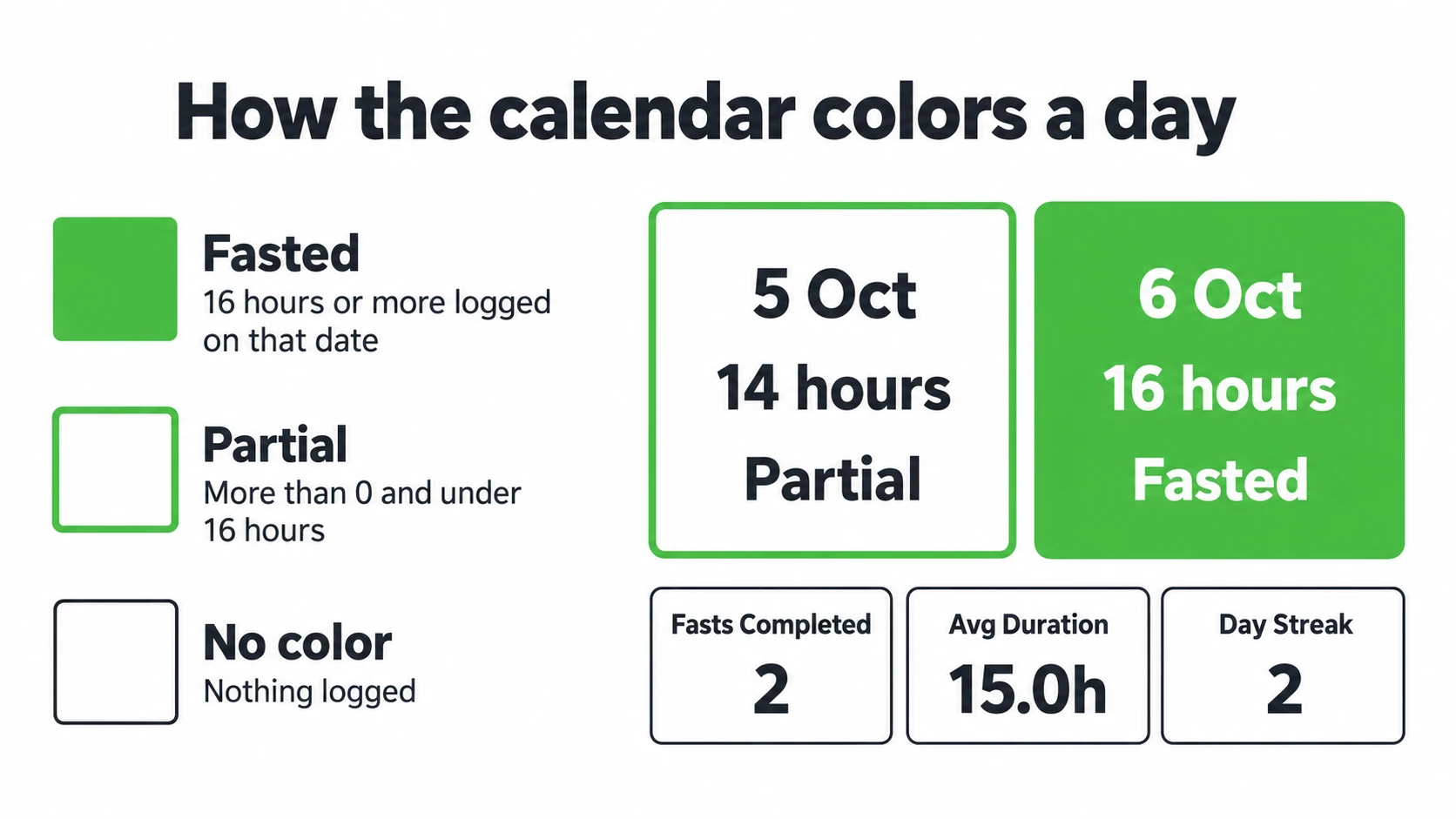
The calendar adds up the hours you logged on each date and colors the day by that total. The 16-hour line is the tracker’s own rule, not a health threshold.
| Hours logged on a date | Calendar shows |
|---|---|
| 16 or more | Fasted |
| More than 0 and under 16 | Partial |
| None | No color (the legend calls this a rest day) |
3. The four totals
| Total | How the tracker works it out |
|---|---|
| Fasts Completed | The fasts you logged with a date in the current month |
| Avg Duration | The average length of every fast you have saved, to one decimal place |
| Day Streak | Days in a row on which a fast of 4 hours or more ended, counting back from today, or from yesterday if none has ended yet today |
| Weight Change | Your latest weight minus your earliest one, once you have two weight entries |
4. Weight, goals and storage
The weight chart plots up to your last 30 weight entries and needs at least two. The lb and kg buttons change how weights show; the tracker keeps one history and converts it. You can also save a target weight and a weekly fasting goal of 1 to 7 days. The tracker keeps both goals for your next visit and shows your progress under the form, for example “3 of 5 fasting days this week. 4.2 lb to go.” Weeks start on Monday, like the calendar.
Saved on this device only. Sign in to keep your fasts in FastingOS.Your weights and goals stay in this browser’s storage, and clearing your browser’s site data removes them.
Worked example: one week of entries
We ran these entries in the tracker on 6 October 2026, signed out and starting from an empty tracker.
| What you log | What the dashboard shows |
|---|---|
| The default fast: 16 hours on 6 Oct | Fasts Completed 1, Avg Duration 16.0h, Day Streak 1, and 6 Oct marked Fasted |
| A 14-hour fast on 5 Oct | Fasts Completed 2, Avg Duration 15.0h, Day Streak 2, and 5 Oct marked Partial |
| A weight of 180 lb on 29 Sep | “Add one more weight entry to see a trend.” |
| A weight of 178.4 lb on 6 Oct | The weight chart appears and Weight Change reads -1.6 lb |
| Switch to kg | Weight Change reads -0.7 kg and the two entries show as 81.6 kg and 80.9 kg |
Progress tracker questions
Where is my progress data stored?
Saved on this device only. Sign in to keep your fasts in FastingOS.Weights and goals always stay in this browser, so a different browser starts without them.
Why is the weight chart empty?
The chart needs at least two weight entries. After one entry, the tracker asks for one more.
How is the daily streak calculated?
The tracker counts back through the dates on which a fast of 4 hours or more ended. It starts at today, or at yesterday if none has ended yet today, and the first date without one ends the streak. So the streak resets only after a whole day with no finished fast. The FastingOS app uses the same rule, and it also asks that a fast reach its target. A streak records logged dates; it does not measure health or progress.
Does the fasting timer add fasts here?
Only when you are signed in and your fasts live in FastingOS: then the tracker shows the fasts you finish with the fasting timer and switches its log form off. Otherwise the timer keeps its own history, so log a finished fast here by hand to see it on the calendar.
Can I undo Clear All Data?
No. The clear button asks you to click a second time within 3 seconds, then removes what this browser holds: your fasts, weights and goals, or only your weights and goals when your fasts live in FastingOS.
Sources
The tracker cites no outside sources because it uses no formula or reference values. Every number it shows comes from the entries you log.
More fasting tools
- Fasting timer: time your next fast against a target, then log it here.
- Fasting weight loss calculator: update your weight-loss timeline when your weight changes.
- Fasting schedule generator: plan the daily eating window you want to log against.
- All fasting calculators: every fasting calculator in one list.