

The fasting schedule generator turns a protocol and the time you want to start eating into a daily eating window and fasting window. Use it to see where 16:8, 18:6, 20:4 or OMAD falls in your day before you commit. It sets one window for every day; it does not plan different days, read your calendar or estimate weight loss.
Last verified 6 Oct 2026 against the generator’s code and two eating-window trials: Liu and colleagues (2022) and Sutton and colleagues (2018).
Fasting Schedule Generator
Create a personalized fasting schedule that fits your lifestyle
Related Calculators
Medical Disclaimer: This calculator provides estimates for educational purposes only and does not constitute medical advice. Intermittent fasting is not appropriate for everyone. Do not fast if you are pregnant or breastfeeding, under 18 years of age, have a history of eating disorders, or have been diagnosed with Type 1 diabetes. If you take medications (especially insulin or blood pressure medication), have any chronic health conditions, or are recovering from surgery, consult your physician before beginning any fasting protocol. If you experience chest pain, fainting, persistent dizziness, or heart palpitations during a fast, stop immediately and seek medical attention.
How your schedule is worked out
The generator does simple clock arithmetic in three steps. Nothing in it depends on your body, so two people who pick the same protocol and start time get the same schedule.
1. The protocol sets the hours
Each protocol has a fixed number of fasting and eating hours in a 24-hour day. The difficulty label is the generator’s own description, not a medical grading.
| Protocol | Fasting hours | Eating hours | Difficulty label |
|---|---|---|---|
| 16:8 | 16 | 8 | Beginner |
| 18:6 | 18 | 6 | Intermediate |
| 20:4 | 20 | 4 | Advanced |
| OMAD | 23 | 1 | Expert |
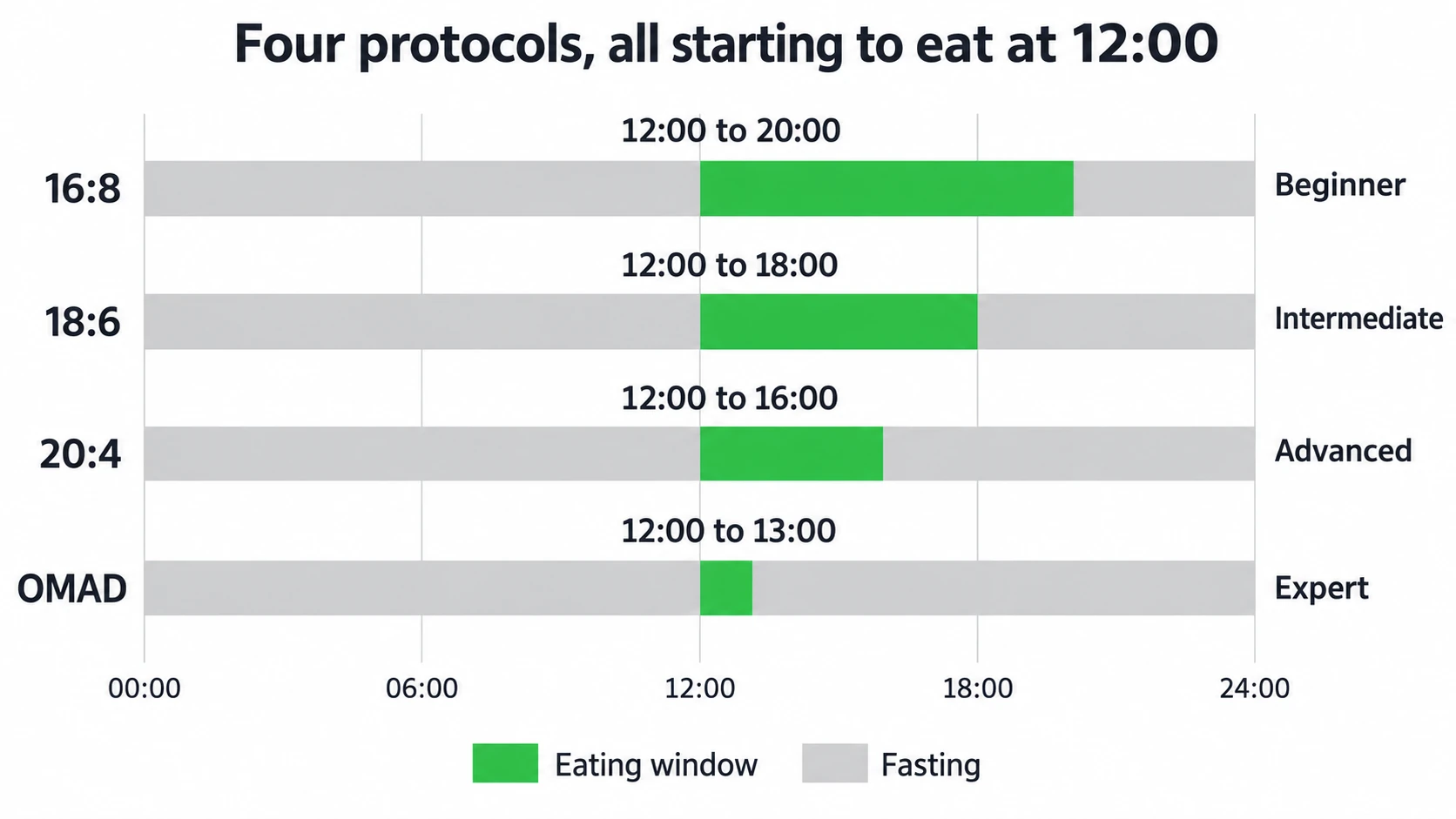
2. Your start time opens the eating window
The eating window starts at the time you enter and closes the protocol’s eating hours later. Your fast runs from that closing time until the same start time the next day. The generator shows times on a 24-hour clock, so a 7:00 PM start on 16:8 gives an eating window of 19:00 to 03:00 that crosses midnight.
3. The same window every day
The result applies to every day of the week. To plan a different day, such as a weekend dinner, change the start time and generate again.
Choosing a start time
The generator accepts any start time. Two trials help you weigh the choice:
- In a 12-month trial of 139 adults with obesity, eating only between 8:00 AM and 4:00 PM on a calorie-restricted diet led to about the same weight loss as calorie restriction alone: 8.0 kg against 6.3 kg, a difference the researchers did not find significant.
- In a 5-week trial in men with prediabetes who ate enough to keep their weight steady, a 6-hour eating window with dinner before 3:00 PM improved insulin sensitivity and blood pressure compared with a 12-hour window.
Neither trial shows that one start time suits everyone. Pick a window you can keep with your work, sleep and training, and ask a clinician first if you take medicine for diabetes or blood pressure.
Sources: Liu and colleagues, New England Journal of Medicine, 2022; Sutton and colleagues, Cell Metabolism, 2018.
Worked example: the default inputs
The generator starts on 16:8 with a 12:00 start time. Press Generate My Schedule without changing anything and you get:
| Part of the result | What you see |
|---|---|
| Protocol | 16:8 Intermittent Fasting |
| Eating window | 12:00 to 20:00 (noon to 8 PM) |
| Fasting window | 20:00 to 12:00 (8 PM to noon the next day) |
| Fasting hours | 16h |
| Eating hours | 8h |
| Difficulty | Beginner |
Fasting schedule questions
Which fasting schedule is best for fat loss?
The generator does not rank protocols for fat loss. In the 12-month trial above, limiting eating to 8 hours added no significant weight loss to the same calorie cut. Choose the window you can keep, and use the fasting weight loss calculator if you want a timeline.
Can I change my fasting schedule on weekends?
Yes. The generator shows one window at a time, so generate a second schedule with your weekend start time and keep both.
What can I consume during the fasting window?
The generator does not cover this. Check a drink, food or supplement against your fasting goal in What Breaks a Fast.
How do I handle social meals that fall outside my eating window?
Move the start time for that day so the meal falls inside the window, then generate again. A 6:00 PM start on 16:8, for example, gives an eating window from 18:00 to 02:00.
Sources
- Calorie restriction with or without time-restricted eating in weight loss. Liu D, Huang Y, Huang C, Yang S, et al. New England Journal of Medicine, 2022; 386: 1495-1504.
- Early time-restricted feeding improves insulin sensitivity, blood pressure, and oxidative stress even without weight loss in men with prediabetes. Sutton EF, Beyl R, Early KS, Cefalu WT, et al. Cell Metabolism, 2018; 27: 1212-1221.
More fasting tools
- Fasting protocol comparison: compare window length, meal pressure and difficulty side by side.
- Fasting timer: run the fasting window you just planned against a target.
- IF macro calculator: turn your TDEE into calories, macros and meal times inside the window.
- All fasting calculators: every fasting calculator in one list.