

The fasting timer counts how long you have been fasting against a target you pick, from 16 to 72 hours or a custom number. It marks clock checkpoints, can send browser notifications, and keeps a history of the fasts you finish. It measures time only, so it cannot tell you whether you are in ketosis or any other body state.
Last verified 6 Oct 2026 against the timer’s code. The timer uses no formula or reference values: it counts clock time.
Live Fasting Timer
Track elapsed time, a target duration, and optional time-checkpoint notifications
Elapsed-Time Checkpoints
Medical Disclaimer: This calculator provides estimates for educational purposes only and does not constitute medical advice. Intermittent fasting is not appropriate for everyone. Do not fast if you are pregnant or breastfeeding, under 18 years of age, have a history of eating disorders, or have been diagnosed with Type 1 diabetes. If you take medications (especially insulin or blood pressure medication), have any chronic health conditions, or are recovering from surgery, consult your physician before beginning any fasting protocol. If you experience chest pain, fainting, persistent dizziness, or heart palpitations during a fast, stop immediately and seek medical attention.
How the timer works
The timer works in four parts: elapsed time, your target, checkpoints, and saving.
1. Elapsed time and progress
The timer takes the time now, subtracts your start time and subtracts any time you spent paused. It shows the result as hours, minutes and seconds. The progress bar fills in step with your target and stops at 100%.
2. Your target
Pick the target before you press Start Fast. The timer locks the target while a fast is running or paused, so the saved target and the one on screen always match. End the session to change it.
| Target option | Hours |
|---|---|
| 16 hours (16:8) | 16 |
| 18 hours (18:6) | 18 |
| 20 hours (20:4) | 20 |
| 24 hours, the default | 24 |
| 36 hours | 36 |
| 48 hours | 48 |
| 72 hours | 72 |
| Custom | Any whole number from 1 to 168 |
3. Checkpoints and notifications
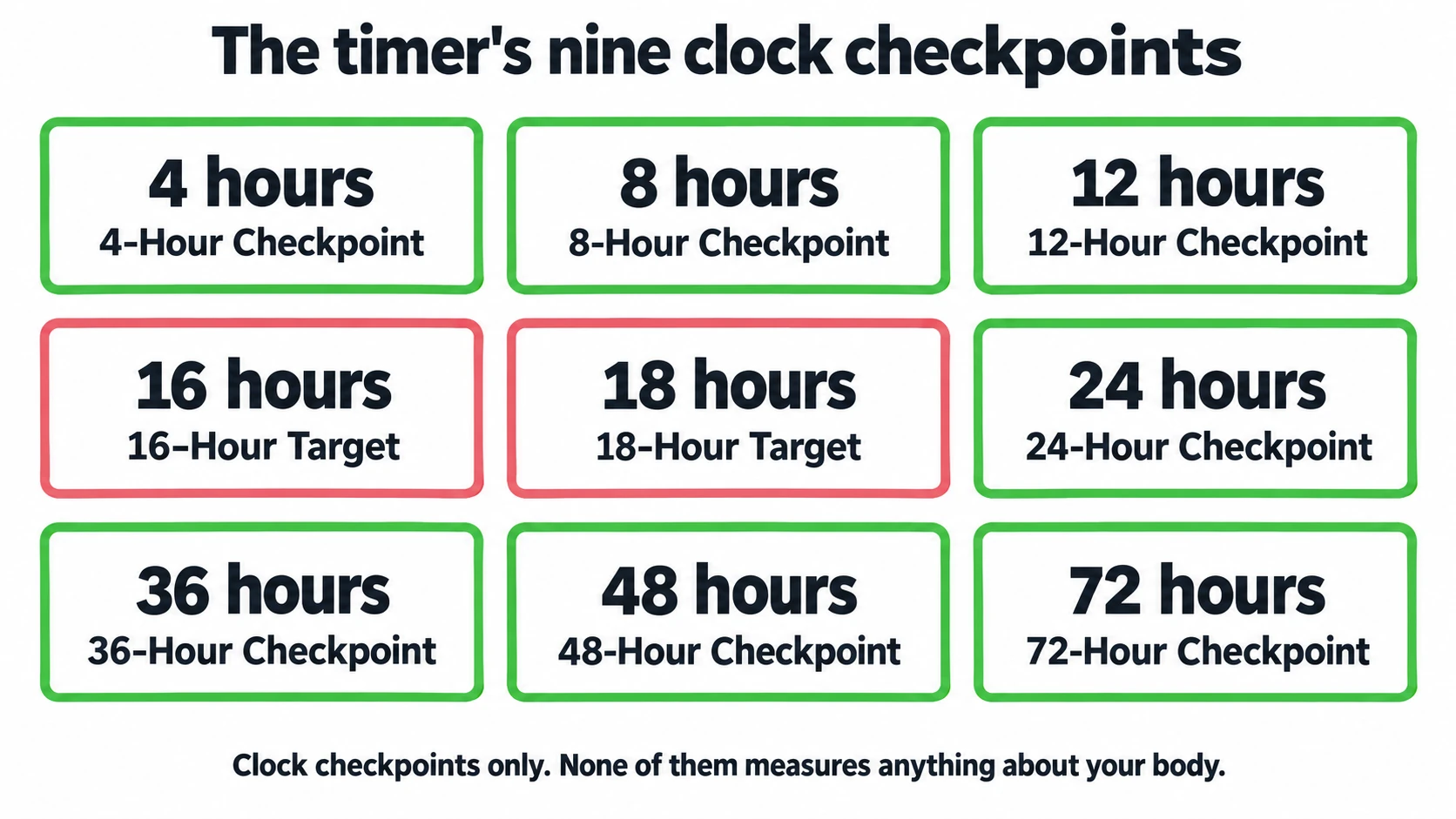
The timer marks nine clock checkpoints: 4, 8, 12, 16, 18, 24, 36, 48 and 72 hours. Each one shows the time left until you reach it, then the word Reached. The timer calls the 16 and 18-hour marks targets because they match the 16:8 and 18:6 fasting windows. None of them measures anything about your body.
If you tick “Enable time-checkpoint notifications” and your browser allows them, you get a notification at each checkpoint saying your timer reached that hour. The timer checks checkpoints while the page is open, so close the tab and the notifications stop until you come back.
4. Saving and history
A reload picks your running timer up where it was. When you press End, the timer saves the fast with its length and whether it reached your target. The history shows your total fasts, your average and longest fast, and your five most recent ones. Day Streak counts the days in a row on which a fast that reached its target, and lasted at least 4 hours, ended by your own calendar. Until one ends today, the streak shows your run up to yesterday, so it resets only after a whole day without one. The FastingOS app counts streaks the same way.
Saved on this device only. Sign in to keep your fasts in FastingOS.Worked example: a 24-hour fast with one pause
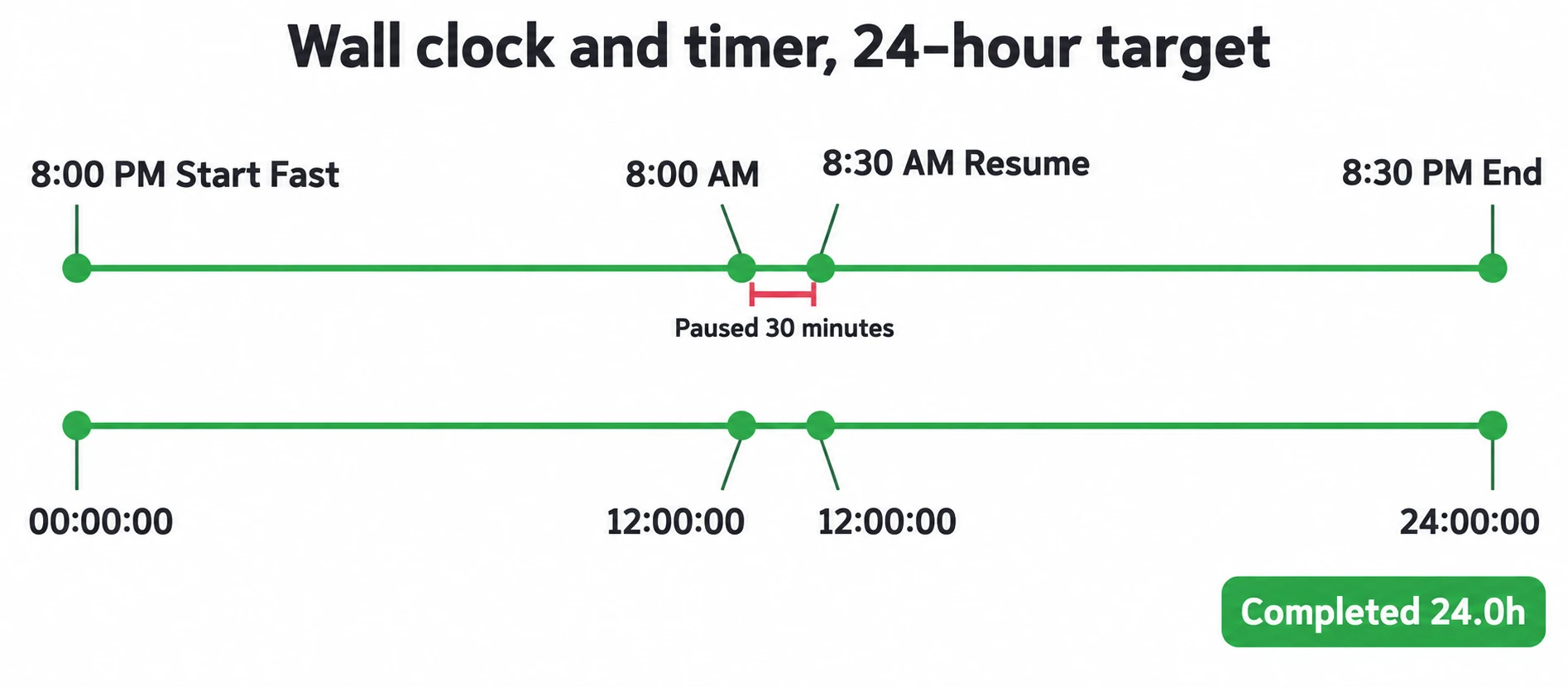
You keep the default 24-hour target and press Start Fast at 8:00 PM. We ran this example in the timer with a simulated clock.
| What you do | What the timer shows |
|---|---|
| Press Start Fast at 8:00 PM | 00:00:00, and the target locks at 24 hours |
| 12 hours later, 8:00 AM | 12:00:00, progress 50%, the 4, 8 and 12-hour checkpoints marked Reached |
| Pause for 30 minutes | The clock stays at 12:00:00 |
| Resume, then wait 12 more hours | 24:00:00 at 8:30 PM, progress 100%, the 16, 18 and 24-hour checkpoints marked Reached |
| Press End | A completed 24.0-hour fast in your history |
The fast lasted 24 hours and 30 minutes on the wall clock, and the timer counts 24 hours because it leaves out the pause.
Fasting timer questions
Does the timer prove that I am in ketosis or autophagy?
No. The timer counts clock time and nothing else. Its checkpoints are reminders, not measurements of your body.
Will the timer continue after I reload the page?
Yes. The page restores a running or paused timer when you come back.
Why are the target controls disabled?
The timer locks the target while a fast is running or paused. End the current session, then choose a new target.
Why did I not receive a notification?
Three things have to be true: you ticked the notifications box, your browser allowed notifications for this site, and the timer page was open when you reached the checkpoint.
What should I do if I feel unwell during a fast?
Stop the fast; the timer does not decide when a fast is safe. Ask a clinician before you try a fast longer than a day, and always if you take medicines or have a health condition.
Sources
The timer cites no outside sources because it uses no formula or reference values. Every number it shows comes from your start time, your pauses and the target you pick.
More fasting tools
- Fasting progress tracker: log finished fasts and your weight to see them on a calendar.
- Fasting schedule generator: plan the daily eating window before you start the timer.
- Fasting electrolyte calculator: check the reference intakes and safety notes before a longer fast.
- All fasting calculators: every fasting calculator in one list.